Handy Library - Book Organizer (MOD)
Last checked date: November 13, 2026
How to install APK / APKS / OBB file on Android
Prefer apk.dog on GoogleAdvertisement
Hi, There you can download APK games file "Handy Library" for Android free, apk file version is 3.3.5 to download to your android device just click this button. It's easy and warranty. We provide only original apk files. If any of materials on this site violates your rights
Screenshots of Handy Library
Description of Handy Library - Book Organizer
📚 Handy Library: Book Scanner and Library Organizer
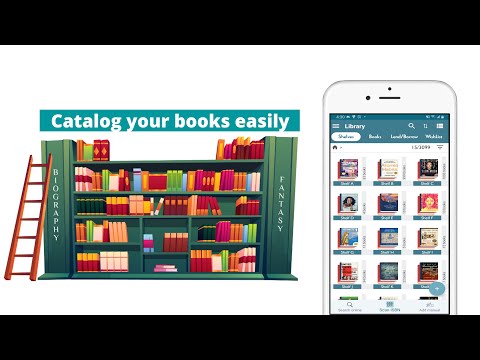
Handy Library is a book scanner, library organizer and book catalog app for your home library, class library or comic and manga collection. Add books by scanning the ISBN barcode, snapping the cover, or taking one photo of a whole bookshelf. Then sort, track and lend them, and never buy the same book twice.
Note: Handy Library is a library management app for cataloging the books you own. It is not an ebook reader.
📷 Add Books Fast
- ISBN scanner: point the camera at the barcode and the title, author, cover and details fill in.
- AI bookshelf scan: photograph a shelf and AI reads the book spines to add the books it finds.
- Cover scan: when there is no barcode for the ISBN scanner, snap the front cover.
- Search online by title, author or ISBN, or add old and rare books by hand.
- Book details come from Google Books, Open Library, Goodreads and Amazon.
🛒 Never Buy a Book Twice
- Check your personal library in seconds at a bookstore or book sale.
- See right away when a book you scan is already in your collection.
📂 Organize Your Bookshelf Your Way
- Bookshelf organizer: virtual bookshelves and locations that match your real shelves.
- Sort by author, title, bookshelf and location or finished date, or drag books into your own order.
- Tags, search and filters by author, publisher, year, genre, series, format, language and reading status.
- Simple book management: edit many books at once.
- Add personal notes to any book and share your finds with friends.
📖 Track Reading and Lending
- Book tracker: mark books read or unread in one tap and keep a TBR bookshelf of books to read next.
- Lend books to friends, set a due date and get a reminder.
- Keep a wishlist of the books you want next.
- Statistics show what your book collection is made of.
📦 A Complete Book Inventory
- Keep a full book inventory of your book library, shelf by shelf.
- Your library catalog is stored on your device. Back up and restore with Google Drive.
- Export and import CSV, XLS or ZIP files for insurance, moving or a spreadsheet of every book you own.
💥 Comic and Manga Collection Tracker
- Comic collector? Scan the barcode to catalog comics and graphic novels, then filter by series.
- Manga library: track every volume you own, lend volumes and wishlist the ones you still need.
- The same book scanner catalogs magazines, CDs, DVDs and sheet music.
👥 Who It's For
- Readers who want a library app for a growing home library, to know what they own and where it is.
- Book collectors who track series, formats and every book in their collection.
- Families who want one catalog for the whole house, including the kids' bookshelf.
- Teachers who run a class library and lend books to students.
- Comic and manga collectors who want one organizer for every series and volume.
💰 Pricing
- Free for your first 100 books.
- One purchase unlocks up to 100,000 books for life, tied to your Google account. No subscription.
❓ FAQ
Is Handy Library free?
Yes. Cataloging up to 100 books is free.
Is Premium a subscription?
No. Premium is a one-time purchase. Pay once and keep it for life, with no monthly or yearly fees.
How many books can Premium hold?
Up to 100,000 books, enough for even the largest home library.
What happens to Premium on a new phone?
Premium is tied to the Google account you bought it with.
How do I move my library to a new phone?
Back up to Google Drive on the old phone and restore on the new one. You can also export a ZIP file and import it.
Running a school or community library? Try SkooLib, our library management system for schools, at www.skoolib.net.
Questions? Email [email protected].
📣 Follow Us
Facebook: fb.com/handylibraryapp
Instagram: instagram.com/handylibraryapp
Handy Library - Where every book finds its place.
Advertisement
Version history Handy Library - Book Organizer
New in Handy Library 3.3.5
• Filter by several authors, statuses or formats• Filter chips above the list; ✕ removes one
• Paste ISBNs again, with dashes, spaces or labels
• Undo a delete from its message
• Move books from the Books tab; small screens show all actions
• Settings: grid covers the same size, or whole
• Restoring a backup keeps your shelves, their order and genres
• Scan the cover of a book you own to view, lend, copy or move it
Fixes: crashes in Loans search, Search book online, after a purchase
Please rate this app
More info
- LicenseFree
- File nameHandy Library
- File Version3.3.5
- Package namecom.handylibrary.main

- CategoryBooks & Reference
- DeveloperBookshare Co., Ltd
- Developer sitehttps://handylibrary.com
- Developer email[email protected]
- Size20.39 MB
- UploadedNovember 9, 2026
- Android10 or later
- md5 hash2a46a1cec697ab1e2ba8c9ed0c71e882
- Architecture-
- Permissions15 show
Advertisement
Other Handy Library APK versions for Android
- APKSHandy Library 3.3.5uploaded: Nov 09 2026 size: 38.81 MBAndroid 10+, x86
- Handy Library 3.3.5uploaded: Nov 09 2026 size: 20.39 MBAndroid 10+
- Handy Library 3.2.3select file version (2)
- APKSHandy Library 3.0.0uploaded: Jan 24 2026 size: 42.32 MBAndroid 7.0+, arm64-v8a
- APKSHandy Library 3.0.0uploaded: Jan 24 2026 size: 41.85 MBAndroid 7.0+, armeabi-v7
- Handy Library 3.0.0uploaded: Jan 24 2026 size: 40.94 MBAndroid 7.0+
- APKSHandy Library 2.9.9uploaded: Nov 25 2025 size: 42.29 MBAndroid 7.0+, arm64-v8a
- APKSHandy Library 2.9.9uploaded: Nov 25 2025 size: 41.84 MBAndroid 7.0+, armeabi-v7
- Handy Library 2.9.9uploaded: Nov 25 2025 size: 40.93 MBAndroid 7.0+
- APKSHandy Library 2.9.4uploaded: Aug 31 2025 size: 41.48 MBAndroid 7.0+, armeabi-v7
- APKSHandy Library 2.9.4uploaded: Aug 31 2025 size: 41.84 MBAndroid 7.0+, arm64-v8a
- Handy Library 2.9.4uploaded: Aug 31 2025 size: 40.75 MBAndroid 7.0+
- APKSHandy Library 2.9.1uploaded: Feb 13 2025 size: 41.17 MBAndroid 7.0+, armeabi-v7
- APKSHandy Library 2.9.1uploaded: Feb 13 2025 size: 41.52 MBAndroid 7.0+, arm64-v8a
- Handy Library 2.9.1uploaded: Feb 13 2025 size: 40.43 MBAndroid 7.0+
Popular android apps for Android
- comic boxversion: 2.0.3updated: Apr 29 2025rating: ★6.7/10
- Janitor: Interactive Storiesversion: 2.8.5updated: Nov 21 2026rating: ★8.4/10
- Bhagavad Gita For All | Videoversion: 7.4.0updated: Nov 17 2026rating: ★9.1/10
 Buenovela - Webnovel & Storiesversion: 3.0.7.1207updated: Nov 12 2026rating: ★9.4/10
- Readmio: Bedtime Stories Aloudversion: 2.7.2updated: Nov 05 2026rating: ★9.7/10
- GoodNovel - Booktok, Storiesversion: 4.4.6.1356updated: Nov 16 2026rating: ★9.1/10
- Inkitt Galatea: Audio & eBooksversion: 24.4.0updated: Nov 17 2026rating: ★9.2/10
- Amazon Kindle: Reading Appversion: 8.159.0.100(2.0.115180.0)updated: Oct 27 2026rating: ★9.6/10
- WebNovelversion: 8.24.3updated: Nov 18 2026rating: ★8/10
- Building Guideversion: 1.910updated: Jun 11 2023rating: ★7.4/10
- Dreame-Read Romance Storiesversion: 5.34.0updated: Nov 09 2026rating: ★8.6/10
- Collins Italian Dictionaryversion: 14.1.864updated: Nov 23 2025rating: ★8.9/10
- ByeBye v4version: 2.2.5updated: Jul 05 2017rating: ★8.3/10
- Hangjam: AI Chat and Roleplayversion: 2.7.5updated: Oct 03 2026rating: ★8.5/10
- TTS Reader: reads aloud booksversion: 9.3.18updated: Jan 20 2026rating: ★6/10
- Storytel - Audiobooks & Booksversion: 26.44updated: Nov 11 2026rating: ★9.2/10
- Tarteel: AI Quran Memorizationversion: 5.83.0updated: Nov 16 2026rating: ★9.4/10
- Star Sports Live Cricketversion: 1.0updated: Apr 13 2021rating: ★7.4/10
- AL Siraat: Learn Quran & Qaidaversion: 1.4.0updated: Nov 15 2026rating: ★9.3/10
- Scribd: 300M+ documentsversion: 16.22updated: Oct 16 2026rating: ★7/10
- Chaptrs - Islamic Audiobooksversion: 3.4.1updated: Sep 26 2026rating: ★9.2/10
- Iqraaly - Audiobooksversion: 6.4.9updated: Oct 07 2026rating: ★7.6/10
- Ami Poddoja : আমি পদ্মজাversion: 10.0.29updated: Nov 19 2026rating: ★9.7/10
- Waktu Solat TV - Masjid Surauversion: 149.0updated: Oct 15 2026rating: ★0/10
